Crypto trade planning · the full workflow

One position.
The whole decision trail.

Bring market analysis, strategy, an approved plan and execution into one connected record. Follow the position while it is open, then use the result to improve the next plan.

Trading runs in the installed terminal. Product screenshots use simulated Demo data.

01 / Market context

Understand the setup.
Keep the evidence.

Read broader market structure alongside the timeframe of the trade. Levels, channels and zones help define the scenario; liquidity and execution context help you assess how the position could be entered or reduced.

Preserve a snapshot of the conditions behind the decision. Later, review the plan against the information available at that moment, with the age and completeness of the data in view.

Explore Market Intelligence
What informs the plan
Structure across timeframes
Levels, channels and zones around the trade. Identify what would support or invalidate the thesis.
Liquidity and execution context
Order-book state and market conditions around a potential entry, reduction or exit.
Timing and market events
Session and calendar context that may matter while the position is open.
A decision-time snapshot
A reference for review, with data freshness and gaps kept visible.
02 / Strategy → position plan

A repeatable method.
A plan for this trade.

The strategy supplies reusable logic. The position plan applies it to a particular account, asset, direction and budget, with the market context and strategy reference attached.

Approve both the initial action and the branches that may become relevant later. The terminal can perform those permitted actions automatically; a separate click is not required for every order.

Changing the method after launch is a deliberate plan review. The system does not invent a replacement strategy while the position is running.

Explore strategy-based planning
Before you approve

Make the decisions explicit.

Scope and capital
Choose the account, asset and supported direction. Allocate the funds or owned inventory the plan needs.
Entry conditions
Define when to enter and what should keep the position waiting.
Responses while open
Set protection, structure-based trailing, partial reductions and the conditions for closing.
Sell-first buyback
For a supported sell-first plan, define the return path for the allocated asset and the proceeds available to buy back.

The approved plan defines what the terminal may do. Your review defines what changes.
03 / Management and execution

The opening order
is only the beginning.

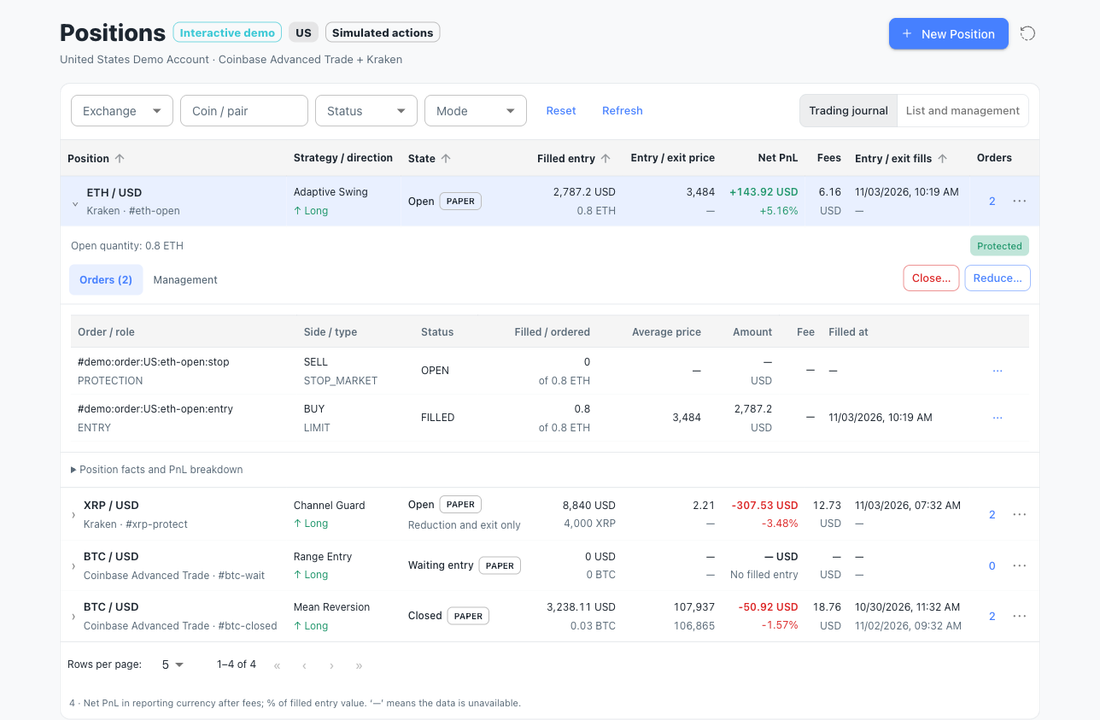
Follow the approved workflow as the market changes. Protection, trailing and staged exits stay connected to the original position, with the actions and execution records available for review.

Position management · orders and actual fillsDemo data
Simulated ETH position showing its Adaptive Swing strategy, a filled entry, an open protective order, quantities, fees and result
Actual Cockpit interface · simulated sample account ↗ Enlarge
Intent

The rule you approved

A planned action describes what may happen when its conditions are met. It is not evidence that an exchange order has filled.

Order state

What is still working

In this Demo, the 0.8 ETH protective sell order is OPEN. Its status and remaining quantity are visible separately from the entry.

Execution

What actually happened

The entry filled 0.8 ETH at 3,484 USD. The record includes 6.16 USD in sample fees, so the review can account for execution costs.

Local monitoring needs the terminal to remain running and connected. Exchange-accepted orders may remain active when the terminal stops. See the execution boundaries below.

04 / Sell-first spot control

Sell owned inventory.
Plan the buyback.

A sell-first position begins with an asset you already own. Allocate part of that holding, sell it under the approved conditions and manage the later buyback as part of the same position.

  1. 01

    Allocate the asset.

    Choose how much owned inventory belongs to this position. The workflow does not borrow the asset or create a leveraged short.

  2. 02

    Record the actual sale.

    Filled sell orders establish the proceeds. The position keeps the quantities and fees with the execution records.

  3. 03

    Buy back within the budget.

    In the proceeds-only workflow, the buyback uses the sale proceeds left after costs and any earlier buybacks. Adding other cash does not expand that budget.

  4. 04

    Review what came back.

    Evaluate the asset units returned, fees and remaining cash. A lower buyback price can return more units; a higher price can return fewer.

The proceeds-only buyback budget
Filled sale proceedsFees paid from those proceeds and earlier buybacksRemaining buyback budget

The result is measured in the asset being managed. More units do not guarantee a higher cash value.

What if the price rises after the sale?

The same proceeds buy fewer units. Selling first can miss an upward move and reduce the amount of the asset you recover. Trading losses remain possible.

Is the original quantity guaranteed?

No. In the proceeds-only workflow, the available proceeds fund the buyback. It does not guarantee that the original quantity will be restored. Fees and execution prices affect the result.

Will protection run if I close the terminal?

Rules monitored by your terminal stop when it is not running or connected; the server does not take over. A planned protection rule is not confirmation of an active exchange order. Review the actual order state.

Try the falling / rising price example

Sell-first requires owned inventory and a supported strategy, account and execution workflow. It does not promise recovery of a drawdown.

05 / One journal, a better next plan

Review the decision.
Then revise the method.

The unified journal brings positions from connected accounts together while retaining their exchange, strategy, plan and execution history. Reconstruct the decision without stitching separate exchange notebooks together.

  • Did the actions follow the plan?Compare the approved conditions with the recorded orders, fills and management events.
  • What shaped the result?Inspect entry and exit execution, fees and the market context. Keep incomplete history visible.
  • What should change next time?Use the findings to revise your next plan. Keep the strategy reference so you know which method the position followed.

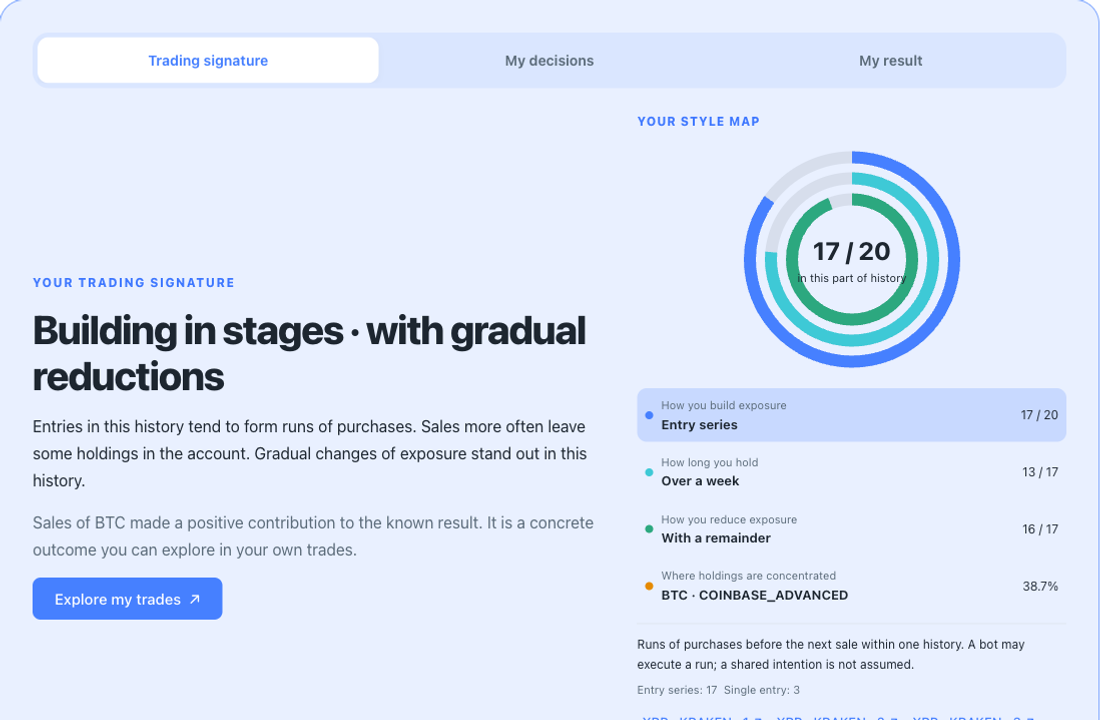
Trader Profile adds a broader view of your entry, holding and exit habits. It complements the evidence for individual positions.

Explore the unified position journal
Trader Profile · habits behind the positionsDemo data
Trader Profile on simulated data, showing the trading style map, gradual entries and reductions with supporting records
Actual Cockpit interface · simulated sample account ↗ Enlarge

Automated comparisons across strategies are in development. Review does not automatically rewrite or optimise your trading plan.

Execution boundaries

Your terminal executes
the approved plan.

Trading keys stay encrypted on your device. The installed terminal signs and sends permitted requests directly to the exchange. Shared cloud services can support plans, history and analytics.

If the terminal stops, local monitoring and plan execution stop. PositionPilot servers do not take over those trades. Orders the exchange already accepted may still be active.

Read the security model
Choose your working toolkit

Build the plan.
Keep the whole position.

Compare Trader and Pro for real positions, or explore the optional Free beta before choosing.

Explore plans
Plan, Manage & Review Crypto Trades | PositionPilot